BRISK ATLAS / GUIDES
Supplier scorecard template (Excel, CSV and printable)
Download the free supplier scorecard template below: an Excel workbook that calculates each supplier’s weighted score, checks the must-have requirements and ranks the eligible suppliers, plus a starter CSV and a one-page printable form. Every formula in the workbook is printed on this page so you can check it.
Downloads
| File | What it contains | Use it when |
|---|---|---|
| Excel template (.xlsx) | Three sheets: a starter Scorecard (room for 8 criteria, 5 suppliers and 5 must-haves; four common criteria and weights filled in to overwrite; score and Pass/Fail drop-downs), a filled-in Example and How to use | You score on a computer and want the totals and ranking calculated |
| Starter CSV | The criteria, weights, supplier and must-have grid as plain text, without the formula rows | You are pasting the grid into another spreadsheet or system |
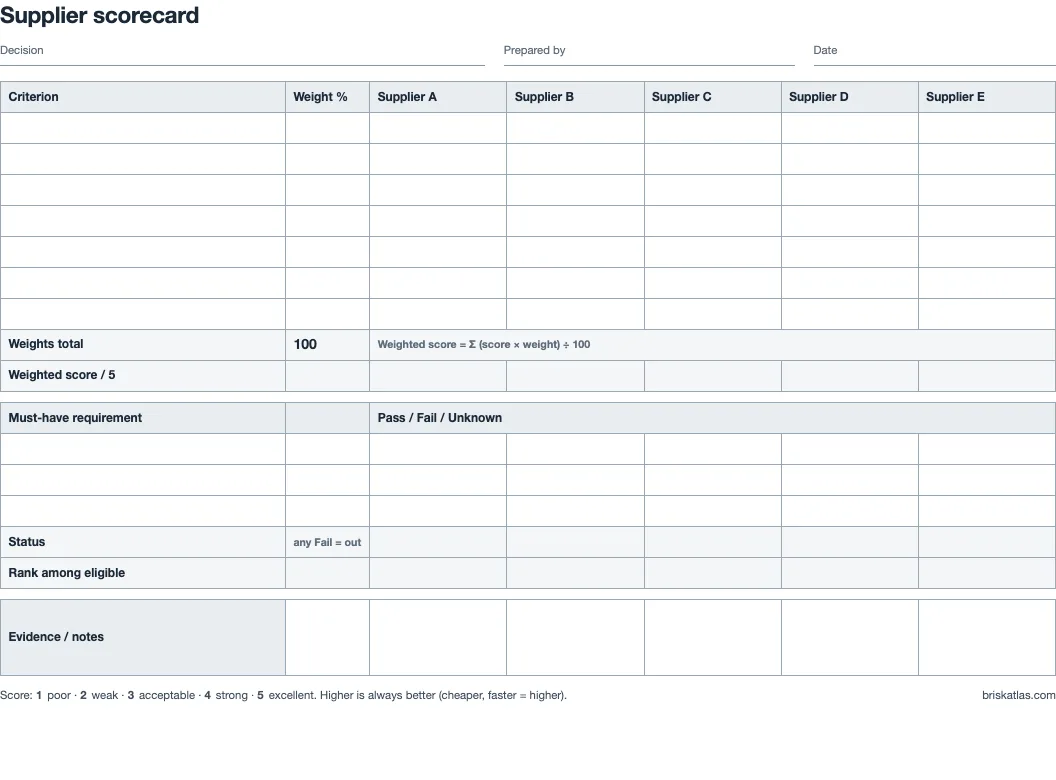
| Printable PDF, US Letter · A4 | One landscape page with the same rows, a score key and a notes row | A panel scores together on paper, for example during a site visit |
What the workbook calculates
The Scorecard sheet keeps criteria in rows 7–14, suppliers in columns C–G and must-haves in rows 19–23. These are the formulas, shown for supplier column C:
| Row | Formula | What it does |
|---|---|---|
| 15 · Weights total | =SUM(B7:B14) | Must show 100 before any score appears |
| 16 · Weighted score | =IF(OR($B$15<>100,SUMPRODUCT(($A$7:$A$14<>"")*(C7:C14=""))>0),"",ROUND(SUMPRODUCT($B$7:$B$14,C7:C14)/100,2)) | Σ score × weight ÷ 100, rounded to two decimals; blank until the weights total 100 and every named criterion has a score |
| 24 · Status | =IF(C16="","",IF(COUNTIF(C19:C23,"Fail")>0,"Failed gate",IF(COUNTIF(C19:C23,"Pass")<COUNTA($A$19:$A$23),"Needs review","Eligible"))) | Any Fail gives Failed gate; any Unknown or blank must-have gives Needs review |
| 25 · Rank | =IF(C24="Eligible",COUNTIFS($C$24:$G$24,"Eligible",$C$16:$G$16,">"&C16)+1,"") | Ranks only the eligible suppliers; 1 is the highest weighted score |
The blank check in row 16 matters because Excel’s SUMPRODUCT “treats non-numeric array entries as if they were zeros” (Microsoft). Without it, a forgotten score would silently count as 0 and drag a supplier down instead of showing that the scorecard is unfinished.
The filled-in example sheet
The Example sheet holds a packaging supplier decision with four suppliers. Opened in a spreadsheet, it gives the same results as Brisk Atlas:
| Supplier | Weighted score | Status | Rank |
|---|---|---|---|
| Harbor Supply | 4.25 | Eligible | 1 |
| Northline Packaging | 4.10 | Eligible | 2 |
| Crestline Box Co. | 4.75 | Needs review | – |
| Fieldworks Co. | 3.75 | Failed gate | – |
The highest total, Crestline Box Co. at 4.75, does not rank: its production sample has not been approved, so it waits in Needs review. The supplier scorecard examples walk through this decision and two others.
With criteria down the side and vendors across the top, the same file works as a vendor scorecard template or vendor comparison matrix template; to review vendors you already use, see the vendor scorecard guide.
The workbook does not show how far a weight could move before a different supplier comes first. To check that, enter the same weights and scores in the online scorecard, or import the example as JSON, and read How robust is the winner?
Questions
Does the template work in Google Sheets?
It uses only SUM, SUMPRODUCT, COUNTIF, COUNTIFS, COUNTA, IF, OR and ROUND, which are all in Google Sheets’ function list, and standard drop-down validation. Upload the .xlsx to Google Drive and open it with Google Sheets.
How do I add more criteria or suppliers?
Insert new rows between rows 7 and 14 so the formulas’ ranges stretch to include them, then extend the drop-downs. For more than five suppliers, copy column G’s formulas to the new column. The online scorecard takes up to 12 criteria and 12 suppliers.
Why is a weighted score blank?
Either the weights in row 15 do not total 100, or a named criterion has no score for that supplier. Both are deliberate: a partial total would look like a real result.
Sources
Sources opened on 29 October 2026. All other figures are calculated on this page from the example scores.
More guides
- Supplier scorecard examples: three filled-in samplesPackaging, contract manufacturing and freight, scored and explained.
- Supplier scorecard metrics: formulas and 1–5 scoringOTIF, defect PPM, responsiveness, invoicing and price, with formulas.
- Supplier evaluation criteria: what to score and what to gateMust-haves versus weighted criteria, with a worked counter-example.
- Weighted scoring model: formula, example and ExcelThe formula, a project selection example and the Excel version.
- Vendor scorecard: running a quarterly vendor reviewA worked quarterly review of three current vendors.