BRISK ATLAS / GUIDES
Weighted scoring model: formula, example and Excel
A weighted scoring model ranks options by multiplying each option’s score on every criterion by that criterion’s weight and adding the results; with weights that total 100%, the score is Σ (score × weight ÷ 100). The example below ranks three improvement projects, then shows the same model in Excel and tests how much the weights matter.
A project selection example
An operations team has budget for one improvement project this quarter. It scores the three candidates from 1 to 5 on four criteria:
| Criterion | Weight | New warehouse scanner workflow | Consolidate packaging suppliers | EDI invoices with top 5 vendors |
|---|---|---|---|---|
| Annual savings | 40% | 4 | 5 | 3 |
| Low effort (inverted) | 25% | 2 | 3 | 4 |
| Low risk (inverted) | 20% | 3 | 2 | 4 |
| Strategic fit | 15% | 5 | 3 | 3 |
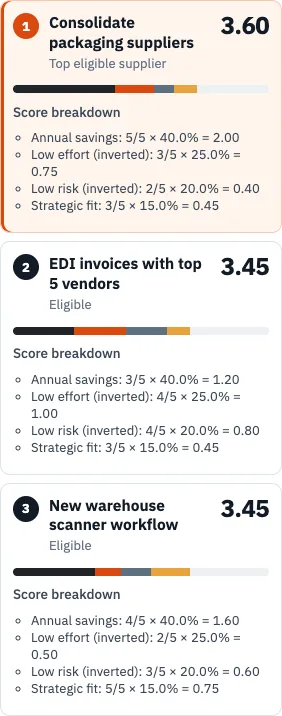
| Weighted score / 5 | 3.45 | 3.60 | 3.45 | |
| Outcome | Rank 2 (tie) | Rank 1 | Rank 2 (tie) |
For Consolidate packaging suppliers: 5 × 40% + 3 × 25% + 2 × 20% + 3 × 15% = 2.00 + 0.75 + 0.40 + 0.45 = 3.60. The ranking is Consolidate packaging suppliers 3.60, EDI invoices with top 5 vendors 3.45, New warehouse scanner workflow 3.45. The last two tie exactly. A tie means the model cannot separate them (Brisk Atlas then lists them alphabetically), so decide between them on something the criteria leave out.
How to create one
- List the options — projects, suppliers, software, sites.
- Pick four to eight criteria that differ between the options. A criterion every option scores the same on adds nothing.
- Weight them to 100% before scoring anything.
- Make higher always better. Turn lower-is-better criteria around (next section).
- Score, multiply, add, then check how sensitive the ranking is.
Lower-is-better criteria
Effort and risk are naturally rated “higher is worse”. Adding them as they are would reward the most effort. Either name and score the criterion the good way round (“low effort”) or convert a 1–5 rating with score = 6 − rating: a project rated 4 for effort scores 2. That is how the example’s effort and risk columns were filled in.
The same model in Excel
Put criteria in rows, weights in column B (as percentages that total 100) and each option in its own column, then use SUMPRODUCT, which multiplies matching cells and adds the products (Microsoft):
=SUMPRODUCT($B$2:$B$5, C2:C5) / 100If the weights do not total 100, the result is no longer on the 1–5 scale, and blank cells count as zero; the supplier scorecard template shows formulas that guard against both.
How sensitive is the ranking?
A weighted scoring model is only as firm as its weights. For each criterion Brisk Atlas searches for the smallest change in its weight — with the others rebalancing in proportion — that hands first place to another option. In this example the closest is annual savings: at 35% instead of 40% (-5 points), EDI invoices with top 5 vendors comes first. That is moderate by the tool’s rule (under 5 points fragile, up to 10 moderate), so the team should be sure savings deserve 40% rather than 35% before committing.
Download this example (JSON) and import it into Brisk Atlas to move the weights yourself. For the supplier-specific version of the method, with must-haves, see the weighted point method for supplier evaluation.
Questions
Do the weights have to add up to 100?
No, but then divide by their total instead of 100: score = Σ (score × weight) ÷ Σ weight. Keeping them at 100% makes each weight read as a share of the decision.
Is a weighted scoring model the same as a decision matrix?
A weighted decision matrix is the table form of a weighted scoring model: options in columns, criteria in rows, weights in a column of their own.
Should I use a 1–5 or a 1–10 scale?
Either works if every criterion uses the same scale and higher is better. A 1–5 scale with a written meaning for each point is easier to score consistently.
Sources
Sources opened on 29 October 2026. All other figures are calculated on this page from the example scores.
More guides
- Supplier scorecard template (Excel, CSV and printable)Excel workbook with formulas, a blank CSV and a printable PDF.
- Supplier scorecard examples: three filled-in samplesPackaging, contract manufacturing and freight, scored and explained.
- Supplier scorecard metrics: formulas and 1–5 scoringOTIF, defect PPM, responsiveness, invoicing and price, with formulas.
- Supplier evaluation criteria: what to score and what to gateMust-haves versus weighted criteria, with a worked counter-example.
- Vendor scorecard: running a quarterly vendor reviewA worked quarterly review of three current vendors.